

Jira Board Setup Guide For Your Team

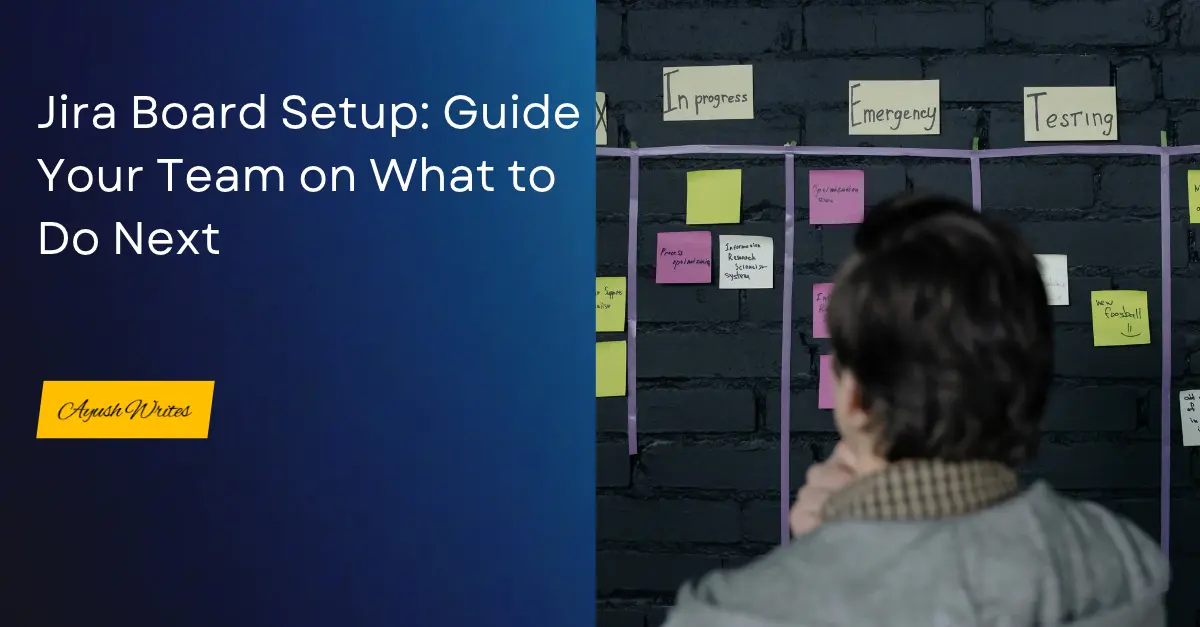
Jira Board Setup

Few operational failures waste agency and corporate resources faster than two team members unknowingly spending days executing the exact same task.


In project operations where tasks span technical optimization, asset creation, and compliance checks—when task ownership lives in disconnected spreadsheets or informal chats, duplicate work goes unnoticed until final review. By then, valuable bandwidth has already been burned, delivery deadlines have slipped, and team members face unnecessary fatigue.


To stop redundant work and keep cross-functional teams aligned, establishing a structured board setup is essential. According to Atlassian agile workflow studies, visual workboards eliminate handoff confusion and increase delivery predictability across multi-departmental projects.


Jira board setup for project managers is the process of building dedicated functional spaces, mapping multi-stage status pipelines, linking Confluence specifications, and organizing clear task sequences so every team member knows their exact roadmap for the upcoming week.


For project operations leads and Scrum managers, configuring this setup correctly replaces constant status checking with a self-directing execution engine. In this guide, you will learn how to structure functional spaces, build a custom 5-stage publishing pipeline, eliminate duplicate effort, and provide your team with a clear 7-to-10-day look-ahead runway.


Building a Jira board setup around strict handoff pipelines and sequential task queues eliminates operational duplication at the root. When every deliverable moves through single-owner status gates supported by direct Confluence notes, your team gains complete execution clarity, allowing you to manage multi-functional pods without micromanagement.

What is Jira Board Setup?


When managing a 10-person Scrum team handling cross-functional project deliverables, our biggest operational breakdown was a complete lack of real-time task visibility. We had multiple instances where two team members were unknowingly executing identical operational tasks simultaneously. The overlap was only discovered when leadership received duplicate submissions—wasting budget, exhausting team capacity, and delaying other scheduled milestones. Setting up dedicated boards with strict status sequences permanently solved this issue by making task ownership completely transparent.

[Dedicated Space: Functional Workboards] 

                 │

                 ▼

[Sequential Pipeline: Planning ➔ Writing ➔ SEO ➔ Review ➔ Publishing]

                 │

                 ▼

[Task Details: Assignee + Deadline + Linked Confluence Notes]

                 │

                 ▼

[7-to-10-Day Look-Ahead Runway for Team Members]


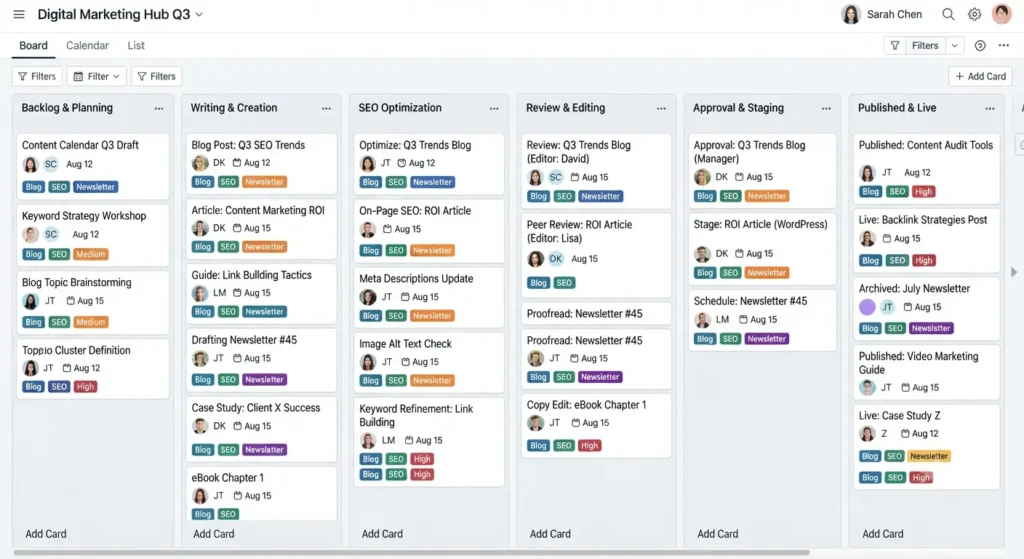
Implementing this structured workflow visualizes your entire delivery pipeline from initial space creation down to daily execution alignment. By standardizing this board architecture, project managers establish clear operational control through three primary operational pillars:


  • Eliminates Redundant Effort: Enforces single-card task ownership so team members never duplicate work or waste execution bandwidth.
  • Provides 7-to-10-Day Execution Clarity: Gives contributors clear visibility into upcoming deliverables, allowing them to prepare research and resources early.
  • Connects Cross-Functional Handoffs: Bridges the gap between writers, SEO specialists, editors, and publishers within a unified board setup.

Moving from unstructured task lists to a sequenced Jira board layout transforms team coordination. When Ayush or any team member can look at the board and immediately see their confirmed assignments for the next 10 days, uncertainty disappears and delivery momentum accelerates.

Jira Board Setup Content Pipeline

What Are the Steps for an Effective Jira Board Setup?


Configuring a sequential board workflow in Jira is the most effective way to eliminate duplicate tasks and keep your team aligned.


Building a Centralized Project Space and Functional Workboards


Start by creating a main project space in Jira to house your overall initiative. Within this space, establish dedicated workboards for the specific functional teams involved, such as Marketing, Finance, and Editorial pods. Adding all relevant team members to these boards creates shared visibility across departmental lines while maintaining clean, focused workspace views.


Mapping a 5-Stage Sequential Handoff Pipeline


For our 10-person Scrum team, we established a strict 5-stage sequential pipeline: Planning, Execution, SEO & Technical Check, Review, and Publishing Pipeline.


  • Planning: The initial strategy queue where deliverable scopes, target criteria, and resource needs are vetted before active execution begins.

  • Execution: The single-owner production phase that guarantees only one team member is assigned per deliverable, completely eliminating duplicate work.

  • SEO & Technical Check: The optimization gateway where specialists verify search parameters, technical tags, and structural requirements.

  • Review: The quality sign-off gate where team leads evaluate finished deliverables; once approved, cards immediately transition into the release queue.

  • Publishing Pipeline: The dedicated handoff stage designed specifically for deployment leads and publishers to format, schedule, and push approved work live.

Setting Assignees, Deadlines, and Resource Parameters


Every task added to the board must carry explicit execution details. Assign a single owner, set an unambiguous deadline, and define the required deliverables directly within the ticket fields. Clearly defining ownership upfront ensures no two team members ever pick up the same deliverable.


Attaching Confluence Deliverable Notes for Full Context


Streamline task execution by linking your Jira board directly to Confluence. Instead of cluttering Jira card titles with lengthy instructions, link dedicated Confluence brief pages containing project guidelines, target benchmarks, and reference material directly to the ticket.


Establishing a 7-to-10-Day Look-Ahead Runway


Enforce an operational rule where team members check their sequenced task queue for the upcoming week to 10 days. When team members and technical specialists know exactly what deliverables are coming down the pipeline for the next 7 to 10 days, they can gather resources, ask clarifying questions early, and execute their weekly workload without mid-sprint confusion.


Following this step-by-step setup replaces chaotic task management with systematic execution control. This operational clarity shields your team’s bandwidth, ensuring your Jira board acts as a reliable, self-guiding engine.

What Are the Key Benefits of a Structured Jira Board Setup?


Transitioning from unstructured task channels to a sequenced Jira board directly improves delivery speed, resource management, and team morale.


Operational Metric

Disorganized / Unstructured Tracking

Sequenced Jira Board Setup

Task Ownership

Unclear assignment leading to duplicated effort

Single-owner cards with explicit handoff columns

Team Visibility

Reactive day-to-day checking without clear direction

Proactive 7-to-10-day look-ahead task queue

Handoff Process

Manual pings across email and chat applications

Automated pipeline flow from Review to Publishing

Resource Efficiency

High risk of team burnout and wasted capacity

Protected bandwidth with linked Confluence briefs

  • Stops Wasteful Duplicate Work: Protects company budget and individual capacity by ensuring deliverables are assigned and tracked transparently.
  • Smooths Editorial Handoffs: Creates a direct pipeline where reviewed tasks automatically form the queue for publishing teams.
  • Boosts Team Preparedness: Allows writers and specialists to review brief notes 7 to 10 days ahead, reducing sprint stress.
  • Scales Multi-Team Governance: Easily manages 10-person Scrum teams and complex workflows within a single, organized workspace.

Adopting this board architecture eliminates the friction of overlapping tasks and missed handoffs. When your workflow relies on clear sequential stages and transparent card queues, your delivery engine scales smoothly while maintaining high quality.

Driving Operational Excellence with Jira Board Setup


Mastering Jira board setup converts multi-team coordination from a chaotic tracking headache into an efficient, transparent operational system. By creating functional workboards, mapping a sequential pipeline from planning to publishing, and linking Confluence notes, you eliminate costly work duplication and empower your team to deliver with confidence.


To discover more practical project management frameworks and execution strategies, explore the latest guides on ayushwrites.in.

How useful was this post?

Click on a star to rate it!

Average rating 0 / 5. Vote count: 0

No votes so far! Be the first to rate this post.

As you found this post useful...

Follow us on social media!

We are sorry that this post was not useful for you!

Let us improve this post!

Tell us how we can improve this post?

Frequently Asked Questions

How does a 5-stage sequential board stop team members from duplicating tasks?

A sequential board enforces single-card creation in the Planning or Writing stage, assigned explicitly to one individual. Because every active topic is visually tracked across the functional workboard, team members and leads instantly see what is in progress, preventing anyone else from starting the same deliverable.

How does Confluence integration support a 10-person Scrum team in Jira?

Linking Confluence to Jira allows project managers to attach comprehensive brief notes, style guides, and research documents directly to a Jira work item. This keeps Jira cards clean and uncluttered while ensuring team members have immediate access to full deliverable specs inside the ticket. 

What is the benefit of a 7-to-10-day look-ahead runway for contributors?

A 7-to-10-day look-ahead runway gives team members early visibility into their upcoming assignments. Instead of waiting for daily task allocations, contributors can review requirements, align dependencies, and prepare background material in advance, leading to faster execution and higher work quality.

How does the Publishing Pipeline column differ from the standard Review stage?

The Review stage is a quality gate focused on operational and managerial sign-off. Once a task passes review, it moves into the Publishing Pipeline column, which serves as an active execution queue specifically for deployment and release leads to handle final staging, scheduling, and live deployment.

Thank you for landing on this page and reading my blog. I will be writing more on project management and also cover my life insights as well. Stay tuned and subscribe to my newsletter. 

About Ayush Kumar


Ayush Kumar is a Project Operations professional and writer with experience in project delivery, business operations, and process improvement. Through AyushWrites.in, he shares practical insights on Project Operations, Process Improvement, project management, workflows, and better ways of working.


With a writing journey that began in 2016, Ayush combines clear communication with a practical approach to managing projects and improving processes. His work explores topics such as governance, risk management, change control, workflow optimization, and operational efficiency.  

For more about Ayush and his journey, visit the About page or connect with him on LinkedIn.

Amazing Years

I started my journey back in 2016, but started working officially since 2023. I worked with so many amazing companies and learnt a lot throughout this journey. And I’m still learning new skills and knowledge. 

Thank you for encouraging Me!

Each time you visit this page, you encourage me to perform better and better. So thank you for visiting and getting to know about me!

Project Governance

Project Governance: Establishing Authority and Accountability

Project Governance: Establishing Authority and Accountability In every project, there are some complex situations which present multiple challenges.   These challenges don’t occur because the engineers don’t know how to build, or because the marketing team lacks creativity. It happens...

Read More
SLA and OLA Delivery Timelines

How to Enforce SLA and OLA Delivery Timelines

How to Enforce SLA and OLA Delivery Timelines When you scale a digital product or an enterprise operation, speed can quickly turn into your biggest liability. Moving fast without structural alignment doesn’t mean you’re agile; it usually means your internal...

Read More
Lean Process Operations

Lean Process Operations: Eliminate Non-Value-Added Steps

Lean Process Operations: Eliminate Non-Value-Added Steps Lean operations are one of the most effective ways to drive efficiency and cut unnecessary costs out of your project processes. Money saved is money earned—and that holds completely true for lean workflows. Every...

Read More
Subscribe to Our Newsletter

We don’t spam! Read our privacy policy for more info.

Let's Connect