


How to Track Work in Jira as a Project Manager?

Jira for Project Managers

Ever wonder why tracking task updates across multiple teams via email chains or scattered messaging apps always leads to missed release dates? When your project operations lack a centralized, real-time board, minor miscommunications snowball into blocked workflows, unclear ownership, and baseline schedule slippage.


According to Atlassian enterprise data, over 300,000 organizations rely on Jira to manage work items and align delivery, proving that establishing a structured tracking tool is crucial for operational visibility.


Jira for project managers provides a centralized workspace to structure spaces, configure Kanban boards, define work items, and govern sprint deliverables across cross-functional teams.


For project managers and operations leads, mastering Jira’s core execution setup is essential to remove handoff friction, eliminate status pinging, and guarantee predictable project releases. In this post, you will learn how to build a dedicated Jira space, organize custom boards, structure work items, and keep cross-functional delivery teams aligned without compromising confidential data.


Setting up Jira around structured work items and clear board statuses turns daily task management into an automated operational engine. These strict visibility boundaries and standardizing issue attributes upfront, you protect team focus, eliminate status-chasing overhead, and safeguard your delivery timelines.

What is Jira for Project Managers?


Jira for project managers refers to the operational setup of a project within Atlassian. Jira used to organize, assign, track, and govern project tasks, development roadmaps, and cross-functional dependencies.


My introduction to Jira began long before entering formal corporate project management. It happened while handling high-volume content operations at a startup agency.  When I later transitioned into a formal project management role, re-introducing Jira with formal clearance from senior leadership immediately solved our cross-functional coordination challenges and status-related issues.

Here’s how to start working on Jira: 


[Create Workspace]
│
▼
[Configure Kanban/Scrum Board] ──► [Define Work Items & Assignees]
│ │
▼ (Approved) ▼
[Set Metadata & Due Dates] ──► [Cross-Functional Alignment]


Implementing this structured workflow visualizes your entire delivery pipeline from initial space creation down to daily execution alignment. When standardizing this board architecture, project managers establish clear operational control through three primary operational pillars:


  • Centralizes Multi-Team Coordination: Brings project managers, content teams, and developer pods into a single shared execution view.

  • Eliminates Manual Status Checking: Replaces static spreadsheets with dynamic columns reflecting real-time work states.

  • Maintains Governance & Privacy: Enables secure setup so baseline project management occurs without exposing confidential client data or sensitive code repositories.

Shifting from ad-hoc task follow-ups to a structured Jira board allows project managers to govern delivery velocity without micro-managing individual contributors. When work items carry explicit assignees, due dates, and priority levels, you replace operational ambiguity with complete execution transparency.


What Are the Steps to Track Work in Jira as a Project Manager?


Executing a standardized tracking workflow in Jira is the most effective way to maintain delivery velocity and keep your team aligned.


Creating a Dedicated Space and Initial Board Setup


Setting up a clear workspace isolates your operational scope from unrelated projects. Begin by navigating to your Jira instance, selecting Spaces, and creating a new project space (such as AyushWrites Task Plans). Choose a template that fits your delivery cadence, typically a Kanban board for continuous operational flow or a Scrum board for fixed-length sprints to establish the main surface where work items progress from inception to release.


Configuring Custom Columns and Workflow Statuses

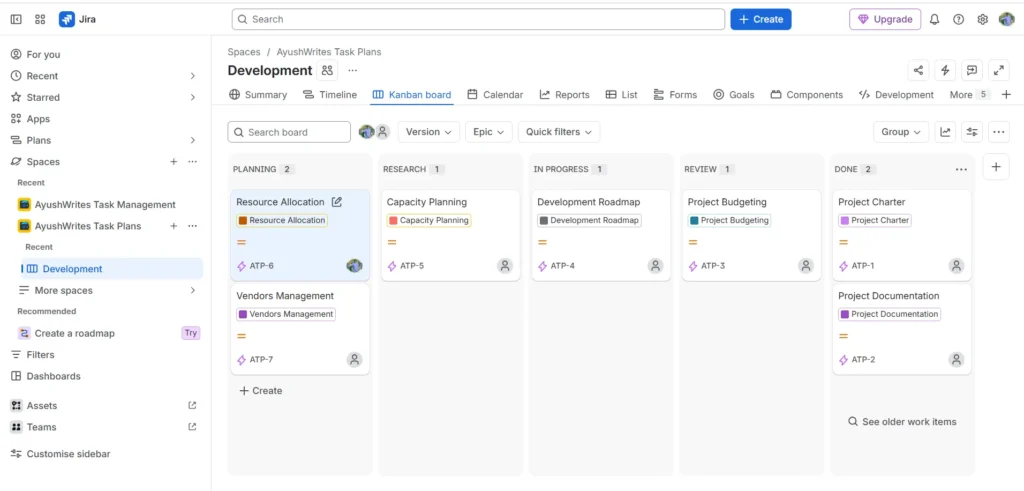
Customize your board columns to mirror your team’s real operational lifecycle rather than accepting generic defaults. Structure your layout across clear sequential stages such as Planning, Research, In Progress, Review, and Done.

Jira for Project Managers
Kanban Board in Jira

The custom 5-stage column architecture established on the board structures task flow through distinct operational checkpoints:


  • Planning: Serves as the initial queue for incoming deliverables and operational tasks, such as Resource Allocation and Vendors Management, ensuring work is defined before active assignment.
  • Research: Acts as an investigation gateway for tasks requiring deeper feasibility analysis or technical investigation, such as Capacity Planning, before execution begins.
  • In Progress: Houses active execution tasks like the Development Roadmap, giving project managers real-time visibility into work currently being built.
  • Review: Establishes a mandatory quality gate for tasks like Project Budgeting, ensuring managerial or technical sign-off before marking deliverables as complete.
  • Done: Archives completed milestones such as the Project Charter and Project Documentation, creating an audit-ready log of finished deliverables.

Defining Detailed Work Items and Metadata 


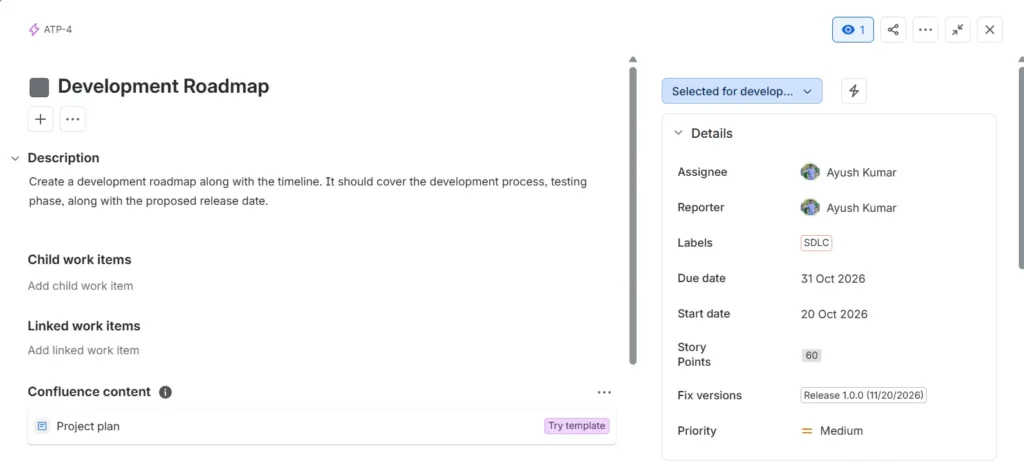
A work item is only as useful as the context it provides to the assignee. When opening a new work item (such as a Development Roadmap task), populate critical detail fields including the Assignee, Reporter, Start Date, Due Date, Priority, and estimated Story Points. Explicit metadata ensures every team member understands task ownership, complexity, and exact delivery targets without requiring separate briefing calls.

Jira for Project Managers
Work Items Details in Jira for Project Managers

Structuring Descriptions and Linking Documentation


Provide explicit execution parameters within the work item’s description section. Detail the expected scope, testing phases, and target deployment timeline directly within the ticket. Where applicable, link supporting documentation such as project charters or Confluence planning pages—so team members have direct access to baseline specifications without leaving Jira.


Keeping Engineering and Cross-Functional Teams in the Loop


Maintain active alignment with developer teams and external stakeholders by tagging assignees, setting sprint releases (e.g., Release 1.0.0), and managing permissions. Ensure basic task setup and daily progress checks remain transparent while restricting permissions on high-security fields, maintaining operational security without blocking routine cross-team collaboration.


This structured sequence will help you transition from reactive follow-ups to full execution control. This systematic approach shields your sprint velocity, ensuring Jira functions as a single source of truth for all project stakeholders.

What Are the Key Benefits of Structured Jira Work Tracking?


Standardizing your Jira project setup directly translates into clear operational visibility and reliable project schedules.


Operational Metric

Traditional / Ad-Hoc Follow-ups

Structured Jira Workflow Setup

Performance Goal

Reactive status chasing via email and chat

Proactive visual tracking across real-time boards

Starting Point

Unstructured task lists and static sheets

Standardized spaces, Kanban boards, and work items

Focus

Daily manual check-ins and progress updates

Total delivery transparency and bottleneck identification

Risk & Return

High risk of missed deadlines and vague ownership

Clear task assignments, explicit due dates, and on-time releases


  • Streamlined Multi-Team Handoffs: Eliminates miscommunication between non-technical project managers and technical development teams.
  • Enhanced Workload Visibility: Provides clear insight into individual story point allocations, preventing team burnout and resource imbalance.
  • Audit-Ready Documentation: Retains a complete history of task updates, approvals, linked documentation, and release versions.
  • Scalable Operational Framework: Creates a repeatable project management baseline that easily accommodates new hires and expanding project portfolios.

Executing this transition replaces chaotic communication channels with a centralized operational baseline. When your tracking runs on clear board statuses and explicit item attributes, your delivery engine scales smoothly while protecting technical quality.

Conclusion


Learning Jira for project managers transforms daily work tracking from an administrative chore into a predictable, high-visibility delivery framework. The structured spaces, configuring clear status boards, and detailing work item attributes upfront, helps you remove operational issues and keep cross-functional teams aligned on every release.


To explore more project management frameworks and tactical execution guides, continue browsing the latest insights on ayushwrites.in.

How useful was this post?

Click on a star to rate it!

Average rating 0 / 5. Vote count: 0

No votes so far! Be the first to rate this post.

As you found this post useful...

Follow us on social media!

We are sorry that this post was not useful for you!

Let us improve this post!

Tell us how we can improve this post?

Frequently Asked Questions

What is the difference between a Space and a Board in Jira?

A Space in Jira acts as the overarching container that holds all work items, settings, and permissions for a specific team or initiative. A Board (such as a Kanban or Scrum board) is the visual representation of work items within that space, displaying them in customizable columns to track operational progress. 

How do project managers estimate work items using Story Points?

Story Points represent a relative unit of measurement used by teams to estimate the overall effort, complexity, and risk required to complete a work item. Rather than assigning fixed hours, project managers and teams assign points (such as 10, 30, or 60) to gauge workload capacity during sprint planning.

How can non-technical project managers collaborate effectively with developer teams in Jira?

Non-technical project managers can collaborate effectively by maintaining clear task descriptions, setting unambiguous start and due dates, and utilizing standard fields like Fix Versions and Labels (such as SDLC). Keeping discussions inside ticket comments ensures complete context without interrupting developer workflows.

Is Jira suitable for basic task management without storing sensitive corporate data?

Yes, Jira is highly customizable for standard task tracking and operational planning. Project managers can easily configure spaces to track project plans, resource allocation, and general milestones while keeping confidential source code or client-sensitive data securely off the platform.

Thank you for landing on this page and reading my blog. I will be writing more on project management and also cover my life insights as well. Stay tuned and subscribe to my newsletter. 

About Ayush Kumar


Ayush Kumar is a Project Operations professional and writer with experience in project delivery, business operations, and process improvement. Through AyushWrites.in, he shares practical insights on Project Operations, Process Improvement, project management, workflows, and better ways of working.


With a writing journey that began in 2016, Ayush combines clear communication with a practical approach to managing projects and improving processes. His work explores topics such as governance, risk management, change control, workflow optimization, and operational efficiency.  

For more about Ayush and his journey, visit the About page or connect with him on LinkedIn.

Amazing Years

I started my journey back in 2016, but started working officially since 2023. I worked with so many amazing companies and learnt a lot throughout this journey. And I’m still learning new skills and knowledge. 

Thank you for encouraging Me!

Each time you visit this page, you encourage me to perform better and better. So thank you for visiting and getting to know about me!

Project Governance

Project Governance: Establishing Authority and Accountability

Project Governance: Establishing Authority and Accountability In every project, there are some complex situations which present multiple challenges.   These challenges don’t occur because the engineers don’t know how to build, or because the marketing team lacks creativity. It happens...

Read More
SLA and OLA Delivery Timelines

How to Enforce SLA and OLA Delivery Timelines

How to Enforce SLA and OLA Delivery Timelines When you scale a digital product or an enterprise operation, speed can quickly turn into your biggest liability. Moving fast without structural alignment doesn’t mean you’re agile; it usually means your internal...

Read More
Lean Process Operations

Lean Process Operations: Eliminate Non-Value-Added Steps

Lean Process Operations: Eliminate Non-Value-Added Steps Lean operations are one of the most effective ways to drive efficiency and cut unnecessary costs out of your project processes. Money saved is money earned—and that holds completely true for lean workflows. Every...

Read More
Subscribe to Our Newsletter

We don’t spam! Read our privacy policy for more info.

Let's Connect